
Introduction
The best traders lose less, not win more. That counterintuitive truth separates profitable algo traders from those who blow up accounts chasing perfect entries. While everyone obsesses over entry signals and strategy logic, professionals know that global exit settings determine survival.
uTrade Algos lets you set portfolio-wide risk management parameters that automatically protect every strategy you deploy—one configuration controlling stop losses, profit targets, and trailing stops across all algorithms.
This risk management guide shows you how to configure global exit parameters that safeguard your capital regardless of which strategies are running or how many positions are open simultaneously.
How to Set Global Exit Parameters on uTrade Algos
Step 1: Login and Prepare Your Portfolio
Begin by logging into your uTrade Algos account using your registered credentials. Once authenticated, you land on the main dashboard.
Before configuring global exit settings, consider preparing your strategy portfolio. While not mandatory, having strategies ready helps you understand total exposure:

Create AI-Generated Strategies: Use AI Strategy Builder to create algorithms by describing trading ideas in natural language. The AI generates complete strategy logic instantly.
Suggested Reading: How to Deploy Your First AI Algo with uTrade AI Strategy Builder?
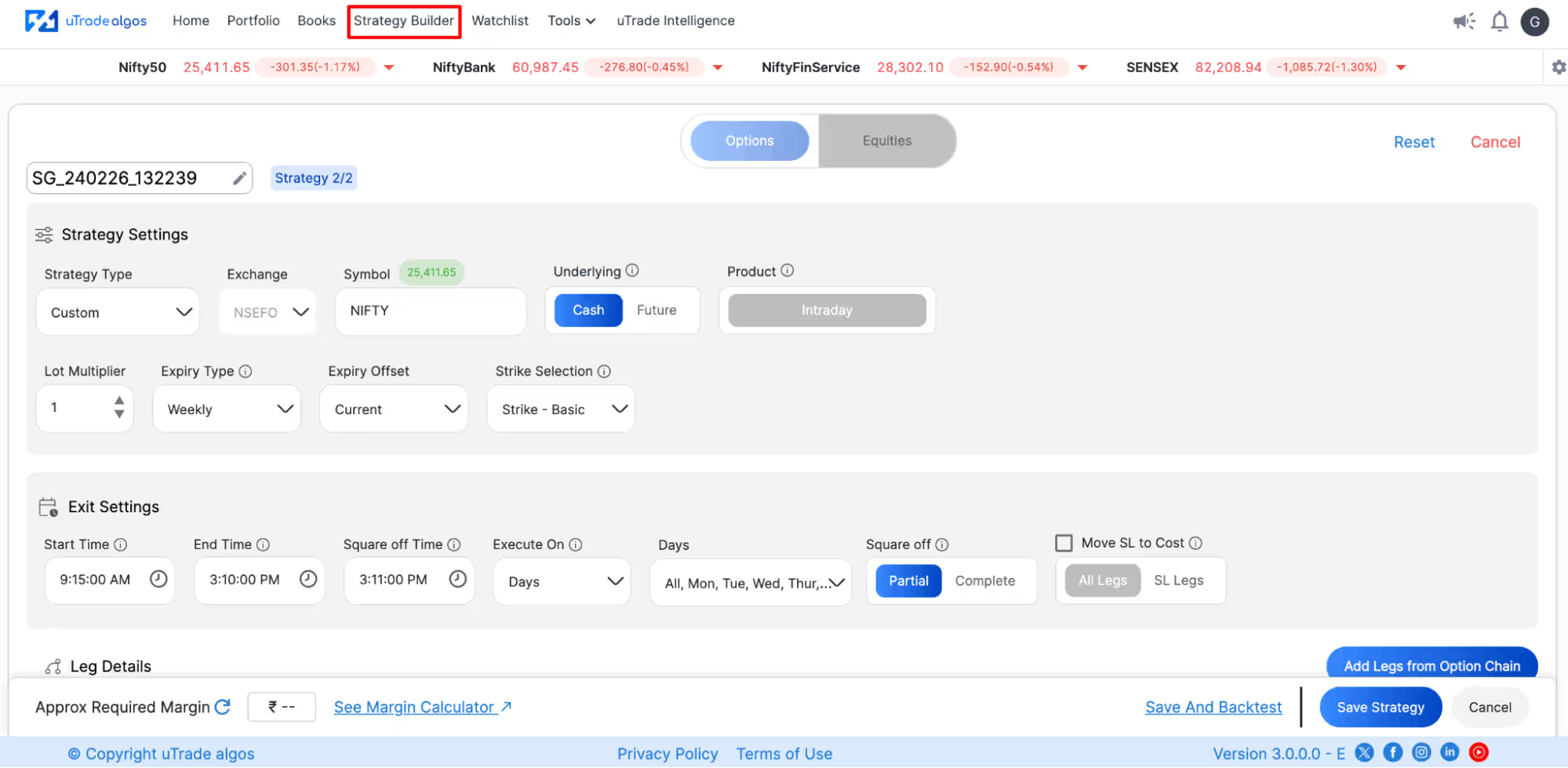
Build Custom Strategies: Navigate to Strategy Builder to create custom algorithms using form-based interfaces—no coding required. Define entry logic, exit rules, position sizing through intuitive dropdowns and inputs.
Suggested Reading: How to Build Form-Based Algos via uTrade Strategy Builder

Select Expert Pre-Built Strategies: Browse Portfolio > Originals for professionally developed, exchange-approved strategies. These ready-to-deploy algorithms cover various market approaches.
Having strategies defined—even if not yet deployed—provides context for setting appropriate global exit parameters based on combined risk exposure.
Step 2: Select Global Exit Settings
Locate your Profile icon or Avatar icon at the top-right corner of the uTrade Algos screen.
Click on this icon to reveal a dropdown menu containing various account management and configuration options.

From the dropdown menu, click on Global Exit Settings. Clicking this option opens the global exit settings configuration screen.
Step 3: Configure Global Target Profit
The first parameter is Global Target Profit—the total portfolio profit level that triggers automatic closure of all positions across all strategies.
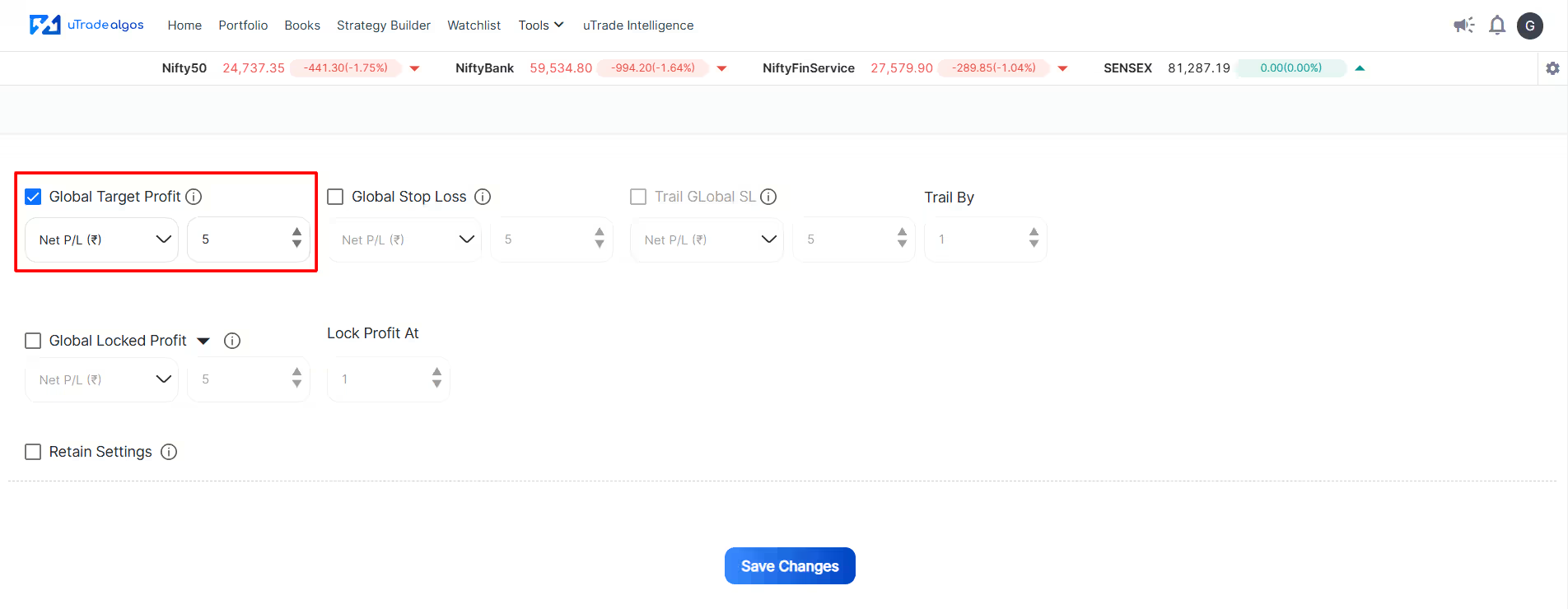
How It Works: When your combined P&L across all deployed strategies reaches this profit amount, uTrade Algos automatically closes all open positions, locking in gains and preventing profit give-back.
Setting the Value: Enter your desired target profit in rupees. For example, if you set ₹10,000 as the global target profit, the platform monitors aggregate P&L continuously. The moment your total unrealized profit reaches ₹10,000, all strategies execute exit orders.
Considerations:
- Set targets based on your capital (e.g., 5-10% of total trading capital)
- Too aggressive targets (very small amounts) might close positions prematurely
- Too conservative targets (very large amounts) might never trigger, offering no protection
- Consider daily vs weekly profit goals—intraday traders might use smaller targets
- Account for transaction costs—ensure profit covers brokerage and taxes
Step 4: Set Global Stop Loss
Global Stop Loss defines the maximum total portfolio loss before automatic closure of all positions.

How It Works: When aggregate unrealized loss across all strategies reaches this threshold, uTrade Algos immediately closes all open positions, preventing further capital erosion.
Setting the Value: Enter the maximum acceptable portfolio loss in rupees. For example, setting ₹7,000 means that if your combined losses reach this amount, all strategies exit regardless of individual strategy stop losses.
Considerations:
- Standard risk management suggests 5-10% maximum portfolio drawdown
- Factor in multiple strategies hitting stops simultaneously during market stress
- Set lower than the sum of individual strategy stop losses (provides extra protection)
- Balance between too tight (frequent unnecessary exits) and too loose (excessive risk)
- Consider volatility—high volatility strategies need wider stops
Example: With ₹1,00,000 capital, a ₹7,000 global stop loss represents 7% maximum drawdown. If you run three strategies with ₹3,000 stops each, the global setting prevents all three from hitting full stops simultaneously.
Step 5: Configure Trail Global Stop Loss
Trail Global Stop Loss is an advanced risk management feature that moves your global stop loss in your favor as profits accumulate, protecting unrealized gains.

How It Works: As portfolio P&L moves into profit, the trailing stop automatically adjusts upward, maintaining a fixed distance below your highest achieved profit. If markets reverse, positions exit when P&L falls back to the trailing stop level, securing partial gains.
Setting the Value: Enter the trailing distance in rupees. For example, a ₹2,000 trailing stop means once profitable, the exit trigger stays ₹2,000 below your peak portfolio P&L.
Practical Example:
- You set the trail global loss at ₹2,000
- Portfolio profit reaches ₹5,000 (trailing stop now at ₹3,000 profit)
- Profit increases to ₹8,000 (trailing stop rises to ₹6,000 profit)
- Market reverses, profit falls to ₹6,000 (trailing stop triggers, closes all positions)
- You've locked in ₹6,000 profit instead of letting it evaporate
Considerations:
- Tighter trailing stops (smaller amounts) protect more gains but might exit during normal retracements
- Wider trailing stops (larger amounts) allow more breathing room but risk giving back more profit
- Particularly valuable for trend-following strategies that can run large profits
- Less useful for mean-reversion strategies with smaller, quicker profit targets
Step 6: Set Trail By Parameter
Trail By defines how much profit must accumulate before the trail global stop loss activates.

How It Works: The trailing stop doesn't engage immediately. Portfolio profit must first reach the trail by threshold before trailing begins. This prevents premature trailing during initial profit development.
Setting the Value: Enter the profit level (in rupees) required to activate trailing. For example, a trail by ₹2,000 means the trailing only starts once the portfolio profit exceeds ₹2,000.
Coordination with Trail Global Loss: These two parameters work together:
- Trail by: ₹2,000 (activation threshold)
- Trail global loss: ₹2,000 (trailing distance)
Scenario:
- Portfolio reaches ₹1,500 profit → No trailing yet (below ₹2,000 threshold)
- Portfolio reaches ₹3,000 profit → Trailing activates, stop set at ₹1,000 profit (₹3,000 - ₹2,000)
- Portfolio reaches ₹5,000 profit → Trailing stop rises to ₹3,000 profit (₹5,000 - ₹2,000)
- Market reverses to ₹3,000 profit → Exit triggered, ₹3,000 secured
Strategic Use: When trail by equals trail global stop loss (both ₹2,000), trailing activates as soon as profit crosses the ₹2,000 threshold. The stop then maintains a ₹2,000 distance below your current portfolio P&L, automatically protecting gains while allowing continued profit growth.
Step 7: Configure Global Locked Profit
Global Locked Profit ensures a minimum profit amount is secured once the portfolio P&L reaches a certain level, preventing any trade from ending unprofitably after achieving substantial gains.
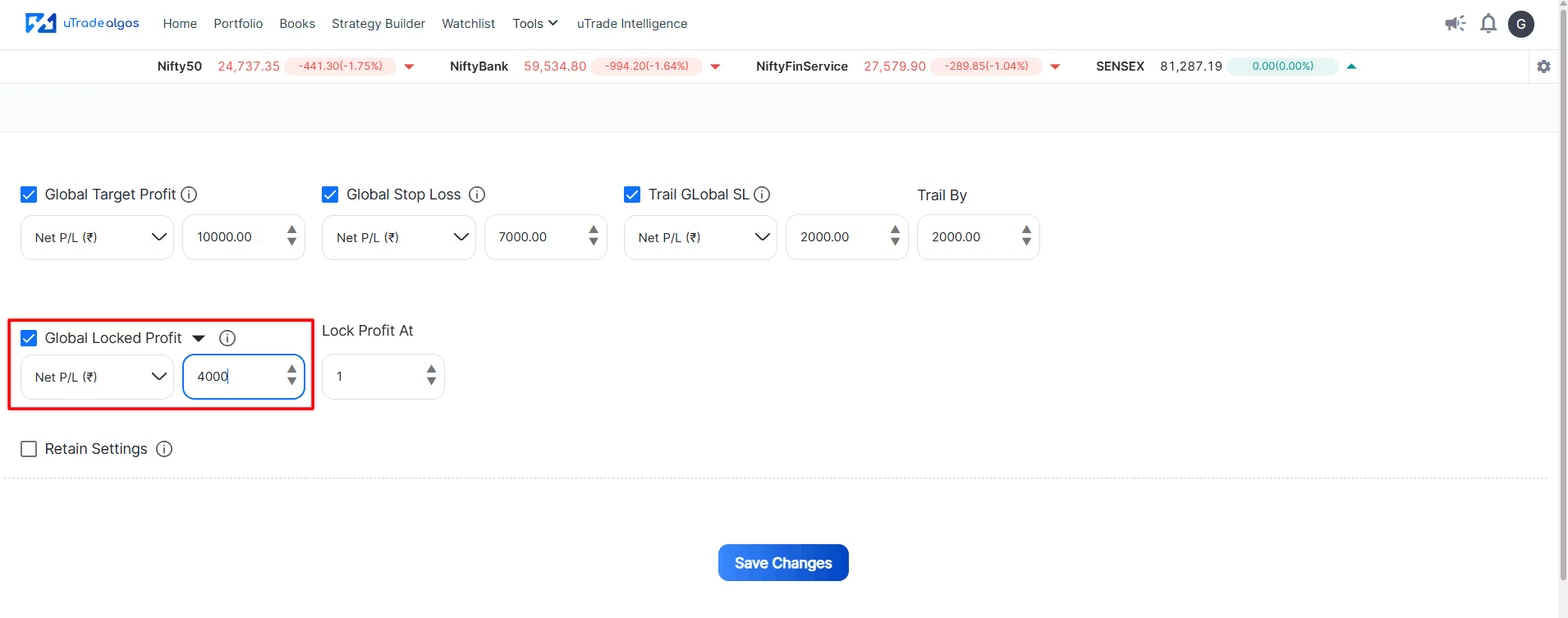
How It Works: Once your portfolio profit reaches the specified threshold, the platform guarantees you retain at least the locked profit amount regardless of subsequent market movements—unless global stop loss triggers first.
Setting the Value: Enter the minimum profit you want to guarantee in rupees. For example, setting ₹4,000 means once this mechanism activates, you can't close with less than ₹4,000 profit.
Coordination with Lock Profit At: Global locked profit requires a second parameter—lock profit at—which defines when the locking mechanism activates.
Step 8: Set Lock Profit At
Lock Profit At specifies the profit level that triggers the global locked profit mechanism.

How It Works: When portfolio P&L reaches this threshold, the locked profit protection activates, guaranteeing the minimum profit you specified in Step 8.
Setting the Value: Enter the profit level (in rupees) that activates profit locking. This should be equal to or higher than your global locked profit amount.
Complete Example:
- Global locked profit: 4,000 (guaranteed minimum)
- Lock profit at: ₹4,000 (activation threshold)
Scenario:
- Portfolio reaches ₹3,500 profit → No locking yet (below ₹4,000 threshold)
- Portfolio reaches ₹4,000 profit → Locking activates immediately, minimum ₹4,000 guaranteed
- Market reverses, profit falls toward ₹4,000 → Exit triggered at ₹4,000, securing full amount
- Even if the market crashes further, you retain ₹4,000 (locked profit protection)
Strategic Considerations: When the lock profit equals the global locked profit (both ₹4,000), the locking mechanism activates instantly upon reaching the threshold, providing immediate protection. This creates a strict profit floor—once you hit ₹4,000, you cannot finish that amount below, regardless of subsequent market movements.
Step 8: Retain Settings Option
The Retain Settings checkbox determines whether your global exit parameters persist across trading sessions or reset.

Checked (Retain Settings Enabled): Your global exit settings remain active and unchanged across all future sessions. Every time you log in, the same parameters apply automatically. You don't need to reconfigure daily—settings stay until you manually modify them.
Recommendation: Enable retain settings for consistency. Risk management should be constant, not reconfigured daily. Checking this box ensures your carefully considered portfolio risk management parameters protect every trading session automatically.
When to Disable: Only disable if you deliberately want different risk parameters each day based on market conditions, capital changes, or strategy modifications. Most traders benefit from consistent, retained settings.
Step 11: Save Changes
After configuring all desired global exit parameters, click the Save Changes button at the bottom of the screen.
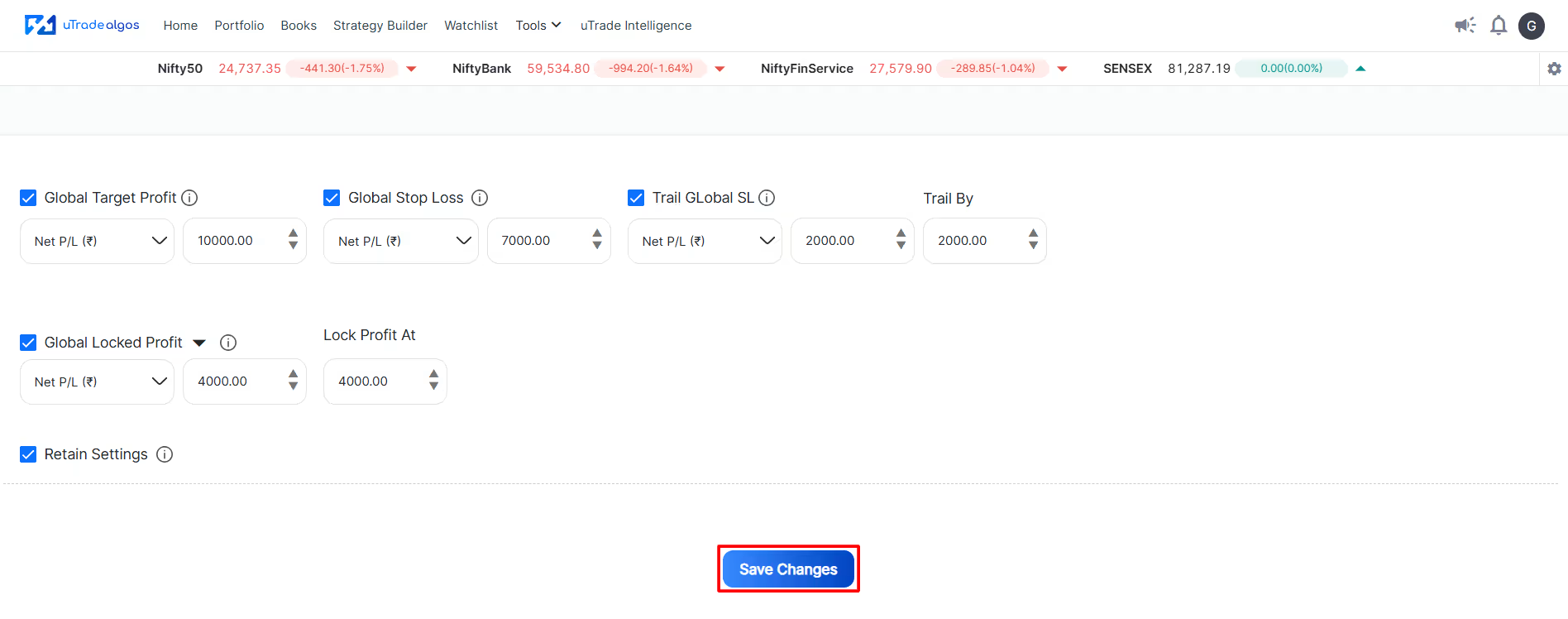
Your global exit parameters now apply to all deployed strategies immediately.
Conclusion
The difference between protected capital and devastating losses isn't luck—it's discipline embedded in global exit settings. You've learned how portfolio risk management transforms from an abstract concept into concrete protection through uTrade Algos configuration.
These global exit parameters work silently in the background, monitoring every rupee of exposure, ready to intervene when individual strategies can't see the bigger picture. Your risk control in algo trading is now systematic, not emotional.
The settings are configured. Your capital has guardrails. Time to deploy with confidence, knowing that while strategies chase profits, global exits protect what matters most—your trading capital.
Frequently Asked Questions (FAQs)
Do global exit settings override individual strategy stop losses and targets?
No, they work together. Individual strategy exits and global exit parameters operate simultaneously. Whichever exit condition triggers first takes effect. If a strategy hits its stop loss before global limits, only that strategy exits. If global stop loss triggers first, all strategies exit simultaneously.
Can I set different global exit parameters for options vs equity strategies?
No. Global exit settings apply universally across all deployed strategies, regardless of instrument type. For instrument-specific risk management, use individual strategy exit parameters. Global settings provide portfolio-level protection spanning all strategy types simultaneously on uTrade Algos.
What happens if I modify global exit settings while strategies are already deployed?
Changes take effect immediately. If you tighten the global stop loss from ₹10,000 to ₹7,000 while running with a ₹8,000 current loss, the exits trigger instantly. Review the current P&L before modifying settings to avoid unintended immediate exits of all active positions.
How do global exit settings work with forward testing vs live trading?
Identically. Global exit parameters apply the same way in forward testing (paper trading) and live trading. This consistency allows you to validate settings with simulated capital before applying to real funds, ensuring behavior matches expectations.
Should I use aggressive or conservative global exit settings for my first deployment?
Start conservative. Set a tighter global stop loss (lower acceptable loss), an achievable global target profit, and enable locked profit at moderate thresholds. After observing performance for several weeks, adjust based on actual results and comfort level with risk exposure.








.svg)





