
Introduction
Trading can be exciting, but it can also be nerve-wracking. Markets move fast, with emotional ups and downs while trading, and even experienced traders can make impulsive decisions that lead to losses. This is where panic control in trading comes into play. On platforms like uTrade Algos, panic control—often referred to as a “kill switch”—is a crucial safety tool that every trader should understand.
In this guide, we’ll break down what panic control is, why it’s important, how it works, and how you can use it effectively on uTrade Algos to protect your investments.
What is Panic Control in Trading?
In simple terms, panic control is an emergency stop mechanism for your trading strategies.
Simply put, panic control is a feature that allows traders to stop all trading activity immediately or at the next configured trading cycle. Think of it as an emergency brake for your trading strategies.
Markets can be unpredictable, and sometimes conditions can change so quickly that even the best strategies might lead to losses. Panic control gives traders a way to:
- Cancel all open orders
- Terminate active strategies
- Pause trading to assess the situation
In trading circles, this is often called a kill switch because it instantly shuts down operations before losses can escalate.
Insight: Many professional traders use panic control as part of their risk management toolkit. It’s not about fear; it’s about control and discipline.
Related Reads:What is the use of the Panic control option?
Why Panic Control Is Important in Trading
Following are the reasons why panic control is important in trading:
Prevents Emotional Decisions
When markets are volatile, emotions like fear and greed can take over. Panic control helps remove emotional bias by automatically stopping trades.
Protects Capital
Losing streaks are part of trading. Panic control ensures you don’t end up overexposed by continuing trades during unfavorable conditions.
Manages Unexpected Market Events
Sudden news events, technical glitches, or flash crashes can wreak havoc. Panic control allows you to pause trading and handle positions manually.
Gives Time to Reassess Strategies
Pausing your strategies lets you analyze what went wrong or right, adjust your plan, and resume trading with a calmer, informed approach.
When Should Traders Use Panic Control?
Here are some practical scenarios where panic control can save you from major losses:
Unexpected Market Volatility
Example: A sudden geopolitical event causes stock prices to drop 5–10% within minutes. Activating panic control prevents further automatic trades that may compound losses.
System Glitches or Technical Errors
Example: Your algorithm may behave unpredictably due to network latency or a bug. Stopping all strategies immediately gives you control.
Portfolio Rebalancing or Strategy Changes
Example: If you want to tweak your strategy or reallocate funds, pause all active trades first to ensure nothing interferes.
Emotional Trading Days
Example: If you find yourself stressed, tired, or making impulsive decisions, a kill switch can pause everything until you’re in the right mindset.
Panic Control on uTrade Algos: Pause All vs Stop All
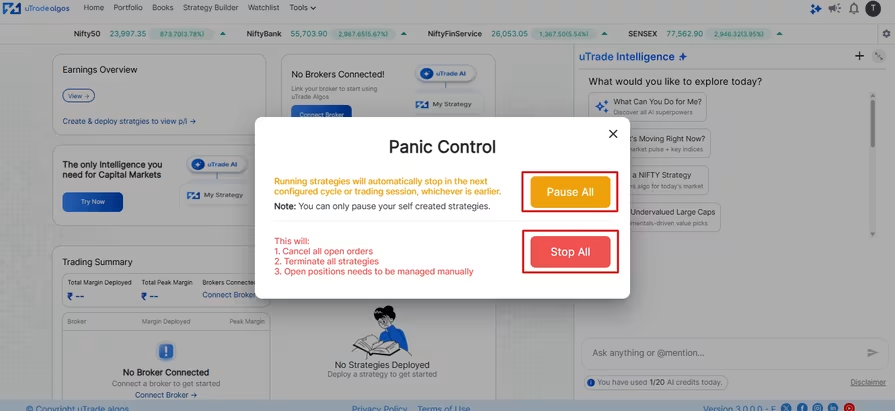
Panic Control is a key safety feature on uTrade Algos that helps traders protect their capital and manage risk. When you open the Panic Control window, you will see two main options:
1. Pause All
- This option allows you to pause all your self-created strategies without affecting pre-built strategies.
- Running strategies will automatically stop in the next configured cycle or trading session, whichever comes first.
- Use Pause All when you want to temporarily stop trading, review performance, or make adjustments to your strategies.
- Important: Open positions remain active and need to be managed manually.
2. Stop All
- This is a more complete shutdown option for urgent situations.
- Stop All wil
- Cancel all open orders
- Terminate all running strategies immediately
- Leave any open positions for manual management
- Cancel all open orders
- Use Stop All during sudden market volatility, technical issues, or any scenario where you want to stop all trading activity immediately.
Practical Tips for Using Panic Control Effectively
- Always Have a Plan: Don’t wait until panic strikes. Decide in advance the conditions under which you’ll use panic control.
- Frequent use may prevent strategies from performing optimally. Treat it as an emergency tool, not a habit.
- Remember, panic control doesn’t close existing trades. Keep an eye on them to avoid unexpected losses.
- Use stop losses, position sizing, and portfolio diversification alongside panic control for maximum safety.
How uTrade Algos Makes Panic Control Easy
uTrade Algos is designed to be beginner-friendly yet powerful enough for experienced traders. Here’s how it supports panic control:
- User-Friendly Interface: Activate the kill switch with just a few clicks. No technical setup required.
- uTrade Intelligence analyzes your strategies in real-time, helping you identify when a pause might be necessary.
- Whether you’re using ready-made strategies or creating your own, panic control integrates seamlessly.
- Alongside panic control, features like automated stop-loss, alerts, and trade monitoring help you protect your capital.
Using panic control on uTrade Algos ensures you’re not trading blindly, even during turbulent market conditions.
Conclusion
Panic control in trading is an essential risk management tool, especially for retail traders navigating volatile markets. On platforms like uTrade Algos, it acts as a kill switch, giving you immediate control over your trades, strategies, and open positions.
By understanding how it works, knowing when to use it, and combining it with solid risk management practices, you can trade smarter, avoid emotional decisions, and protect your capital.
Remember: Trading is not about avoiding risk entirely—it’s about managing it smartly.
Frequently Asked Questions (FAQs)
Can I use Panic Control on strategies created by someone else?
No. You can only pause or stop strategies that you have personally created on uTrade Algos. Strategies assigned by a third party need to be managed separately.
Will my strategies automatically restart after I use Panic Control?
No. Once terminated via Panic Control, strategies will not resume on their own. You need to manually restart them after reviewing and resolving the issue that prompted the stop.
What's the difference between Pause All and Stop All on uTrade Algos?
Pause All stops strategies at the end of the current configured cycle — a softer stop for less urgent situations. Stop All (Panic Control) is the emergency action that cancels open orders and terminates strategies as quickly as possible, suitable for urgent, fast-moving situations.
How often should I use Panic Control?
Panic Control is an emergency safety tool, not a routine feature. Use it when market conditions are extreme, your strategies are behaving unexpectedly, or you need to step away and reassess. Overusing it unnecessarily may interrupt your strategies from executing their intended logic.
How quickly does Panic Control work on uTrade Algos?
It acts immediately. The moment you trigger Panic Control, open orders are cancelled right away. Running strategies are stopped at the next configured cycle or trading session — whichever comes first.
This means the platform doesn't abandon a strategy awkwardly mid-execution; it completes the current logical step and then terminates cleanly. In fast-moving markets, this speed matters — which is why knowing where the button is before a crisis is so important.
.avif)
.avif)
.avif)

.avif)
.avif)
.avif)

.svg)





