

Introduction
Algo trading is not just about building one profitable strategy — it’s about managing multiple strategies together in a structured way. That structure is called a portfolio.
In traditional investing, a portfolio is simply a collection of assets — stocks, bonds, gold. In algorithmic (algo) trading, the concept goes one level deeper. Here, a portfolio isn't just a basket of assets — it's a collection of automated strategies, each running on different instruments, timeframes, and market conditions simultaneously.
Think of it this way: instead of manually picking stocks, you build or subscribe to algorithms that trade on your behalf. A well-designed algo trading portfolio combines multiple such algorithms to reduce risk and improve consistency — even when individual strategies underperform.

What is a Portfolio in Algo Trading?
A portfolio in algo trading is a collection of multiple trading strategies, assets, or systems running together under one account.
Instead of relying on a single algorithm, traders combine different strategies to:
- Reduce risk
- Smooth returns
- Improve long-term performance
Simple Example:
Imagine you run:
- 1 strategy on Nifty (trend-following)
- 1 strategy on Bank Nifty (mean-reversion)
- 1 options selling strategy
All of these together form your algo trading portfolio.
Read more about how to Create Portfolio
Why Portfolio Matters in Algo Trading
Many traders focus only on strategy accuracy, but professionals focus on portfolio performance.
Here’s why:
Risk Reduction
Not all strategies lose at the same time. A diversified portfolio reduces overall drawdown.
Consistent Returns
Some strategies work in trending markets, others in sideways markets. A mix ensures steady performance.
Capital Efficiency
Instead of putting all capital into one strategy, you distribute it intelligently.
Suggested reads: The Role of Algorithmic Trading in Diversifying Investment Portfolios
Key Components of an Algo Trading Portfolio
A robust algo trading portfolio has four pillars:
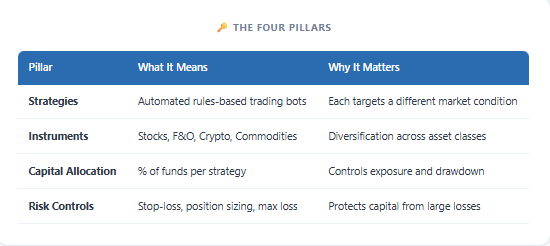
For Indian traders specifically trading on NSE/BSE, F&O strategies form the core of most algo portfolios — because they offer liquidity, leverage, and well-defined expiry cycles.
How Portfolios Are Created in Algo Trading
Instead of relying on one strategy, traders use a mix of strategies to:
- Reduce risk
- Improve consistency
- Handle different market conditions
Typically, portfolios are created by:
- Selecting strategies with different logic
- Allocating capital across them
- Backtesting combined performance
- Deploying them together
Once your portfolio is ready, the next step is execution.
This is where platforms like uTrade Algos simplify everything.
How to Create a Portfolio on uTrade Algos
On uTrade Algos, you have three ways to build your portfolio:
Let’s go step by step.
Check complete uTrade algos user manual here!
I. Use Pre-Built Strategies - uTrade Originals
These are ready-made strategies designed and used by professionals.
Step 1: Log in to the platform, go to the Portfolio section

Step 2: Click on Originals

Step 3: Select a strategy based on your goal

Step 4: Run a forward test to check performance

Step 5: Click Deploy

These strategies are exchange-approved and widely used by fintech and financial firms.
II. Use AI to build a strategy faster
uTrade Algos: Step-by-Step Tutorial from Login to Live Deployment
Step 1: Login & Access
Log in to uTrade Algos & go to uTrade Intelligence.

Step 2: Enter Your Idea
Type your strategy in simple language
Example:
“Create an intraday Bank Nifty options strategy using RSI”

Step 3: AI Generates Strategy
The system will automatically create your strategy
It includes:
- Entry rules
- Exit rules
- Indicators
- Instruments
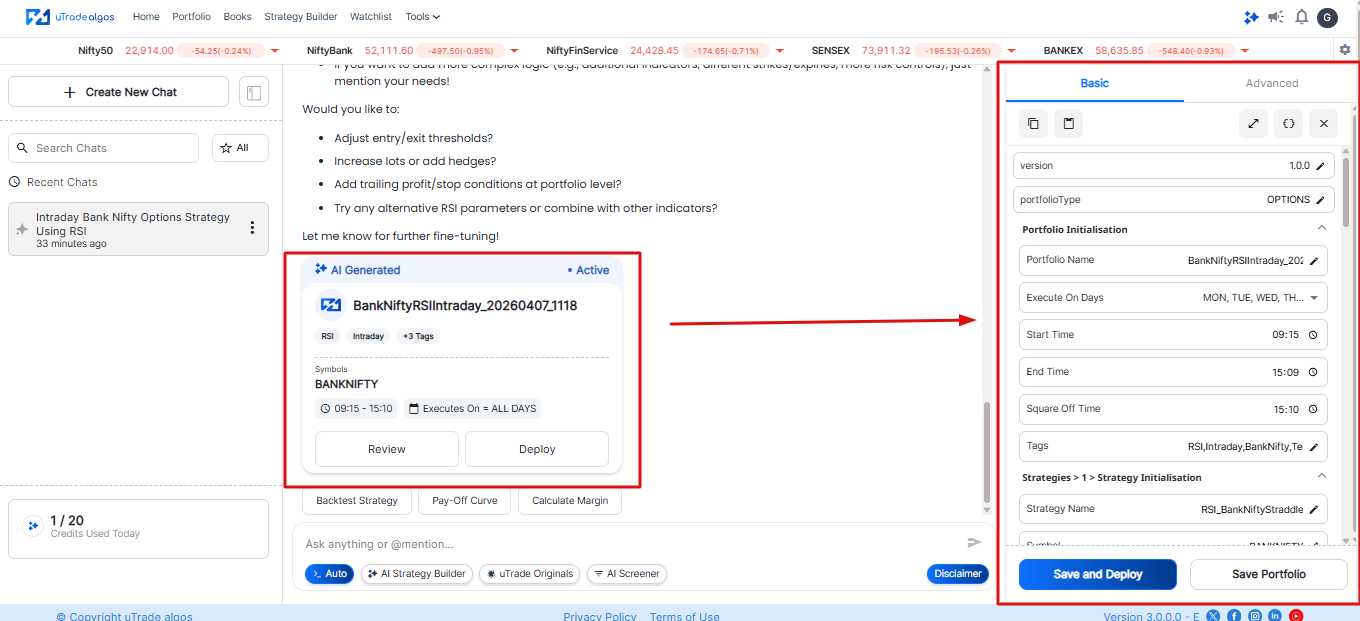
Step 4: Review Strategy
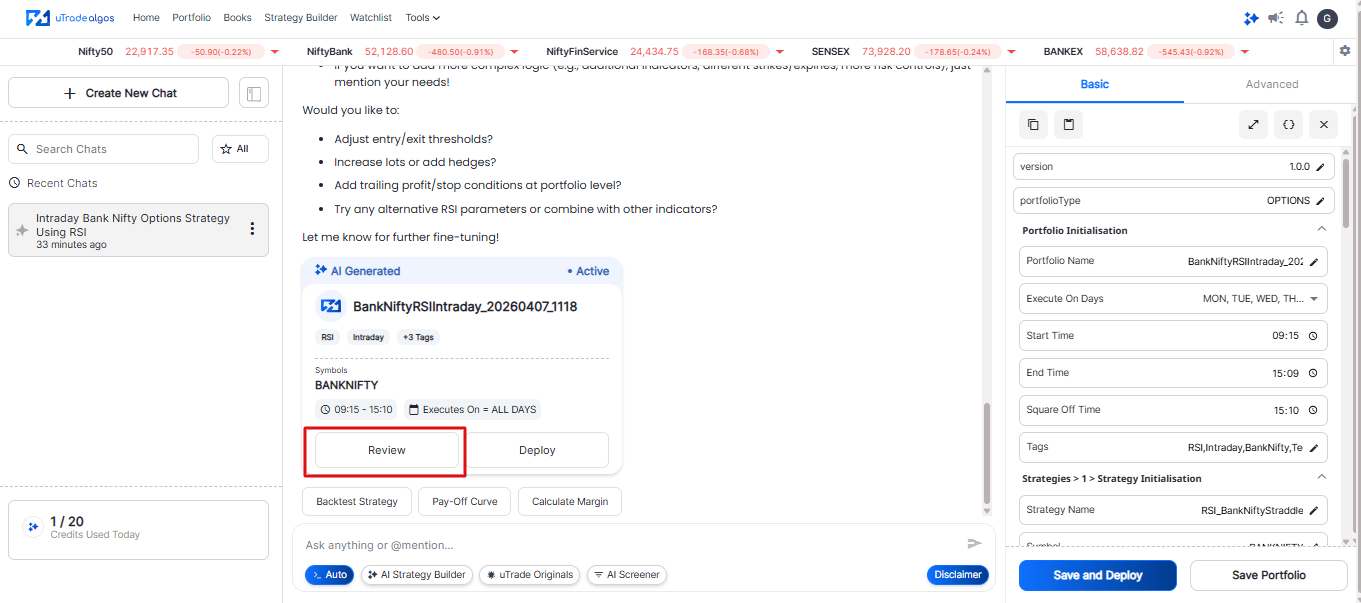
Click Review
Check details like:
- Symbol (e.g., BANKNIFTY)
- Entry/Exit logic
- Stop loss
- Trade timing
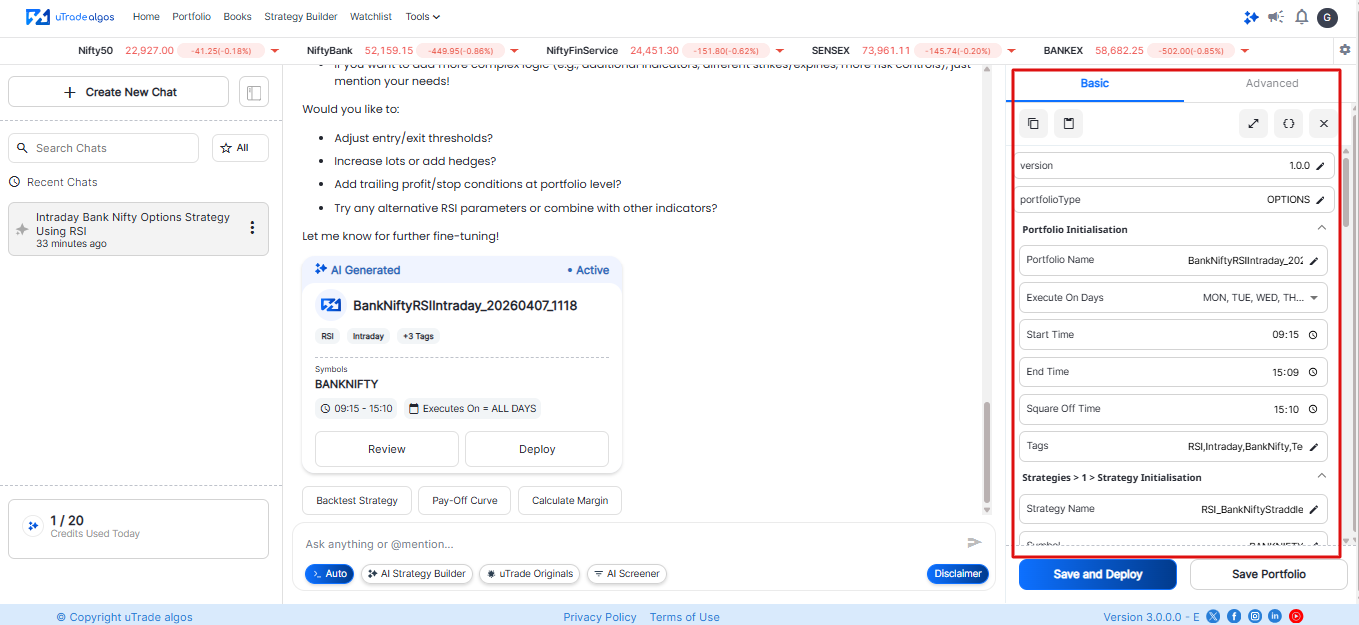
Step 5: Edit (Optional)
- You can customize the strategy
- Advanced users can edit logic in detail
Step 6: Review & Analysis
- Run a backtest instantly
- Check the Payoff Curve
- Review margin requirements.
- Analyze performance using historical data
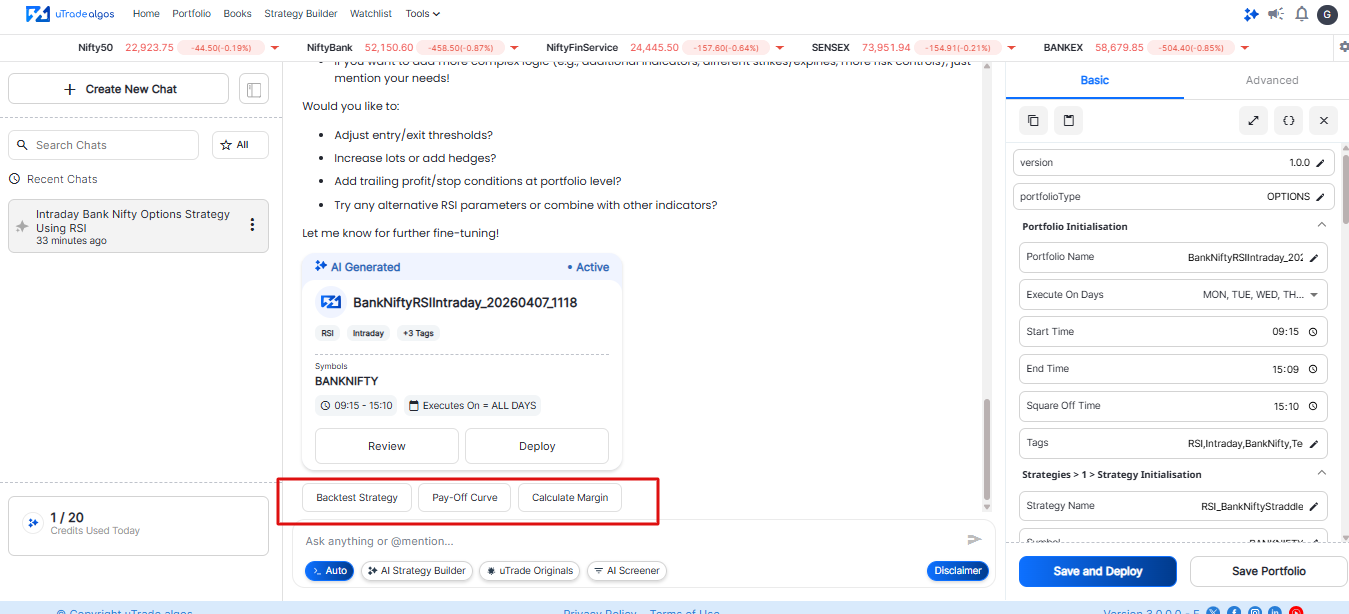
Step 7: Save or Deploy
Choose:
- Save for later
- Save & Deploy instantly
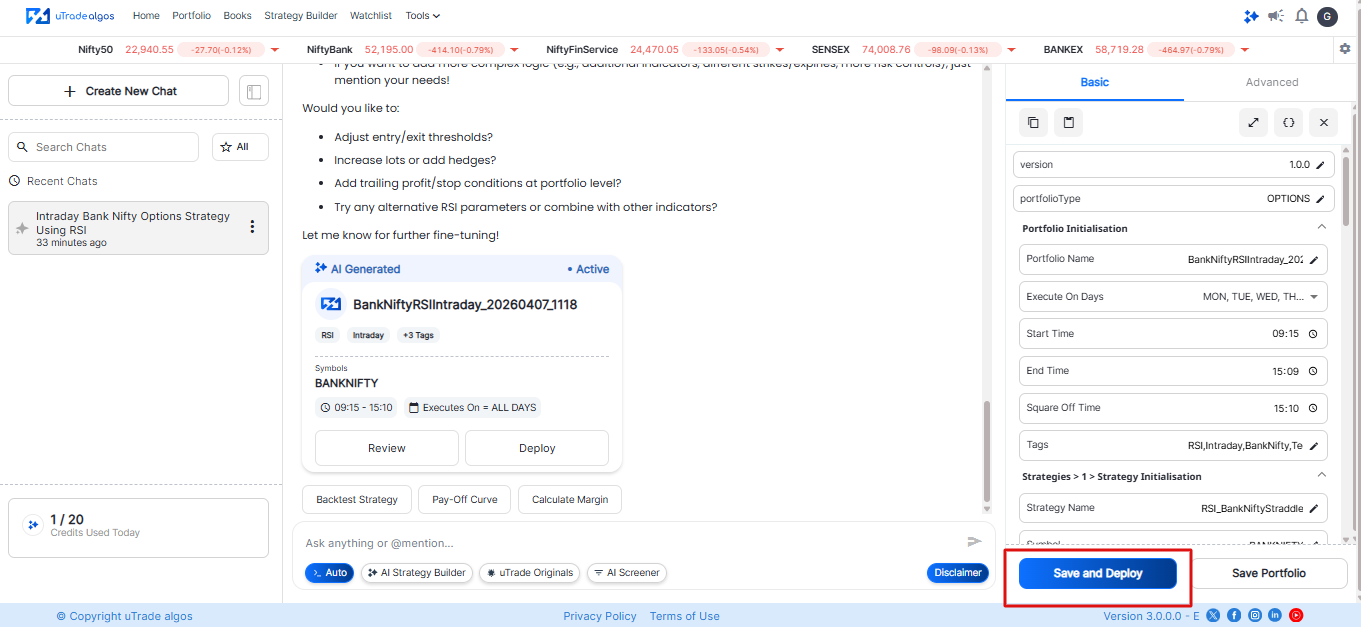
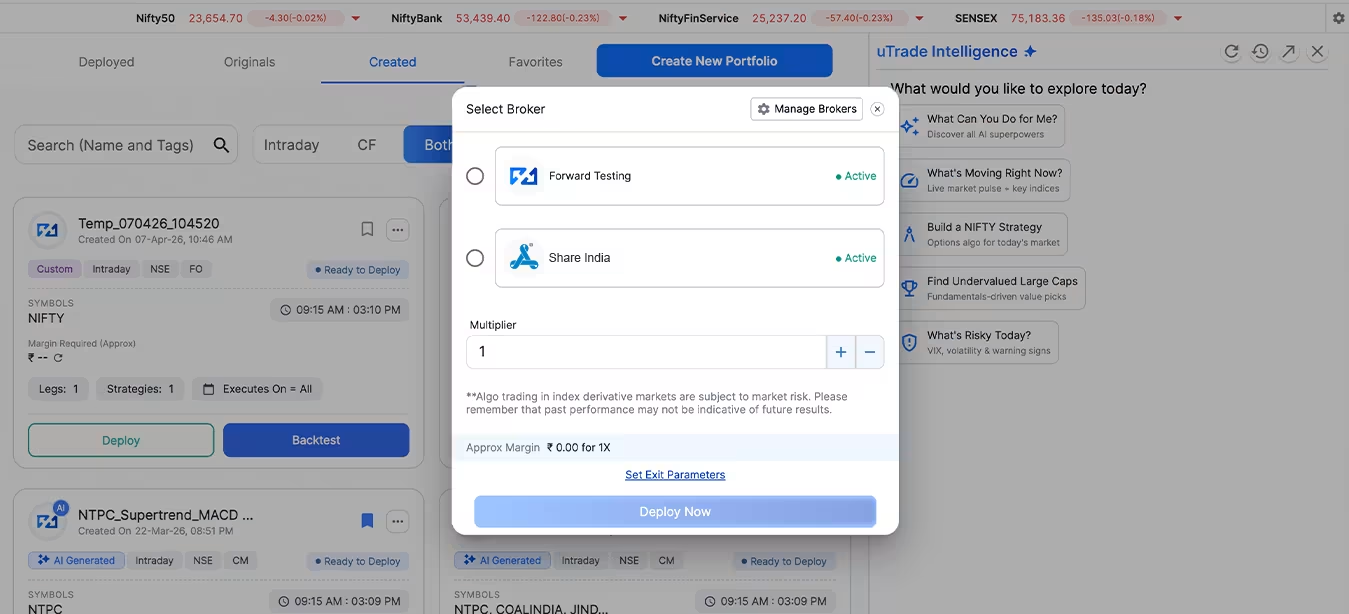
Step 8: Select Broker
- Choose your connected broker
- Set multiplier (lots size)
Step 9: Confirm
After deployment, you can view this strategy under the Portfolio → Created section.
Suggested Reading: How to Deploy Your First AI Algo with uTrade AI Strategy Builder
III. Create Strategy Manually
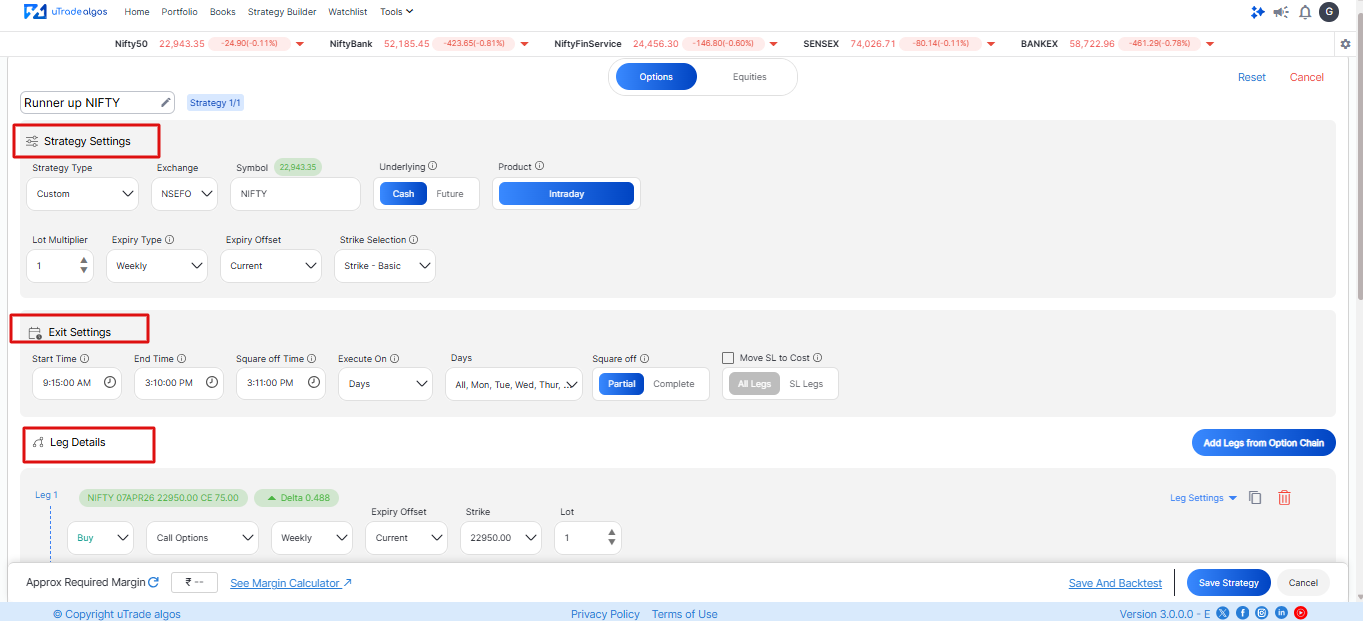
Step 1: Go to Strategy Builder

Step 2: Enter:
- Strategy name
- Symbol
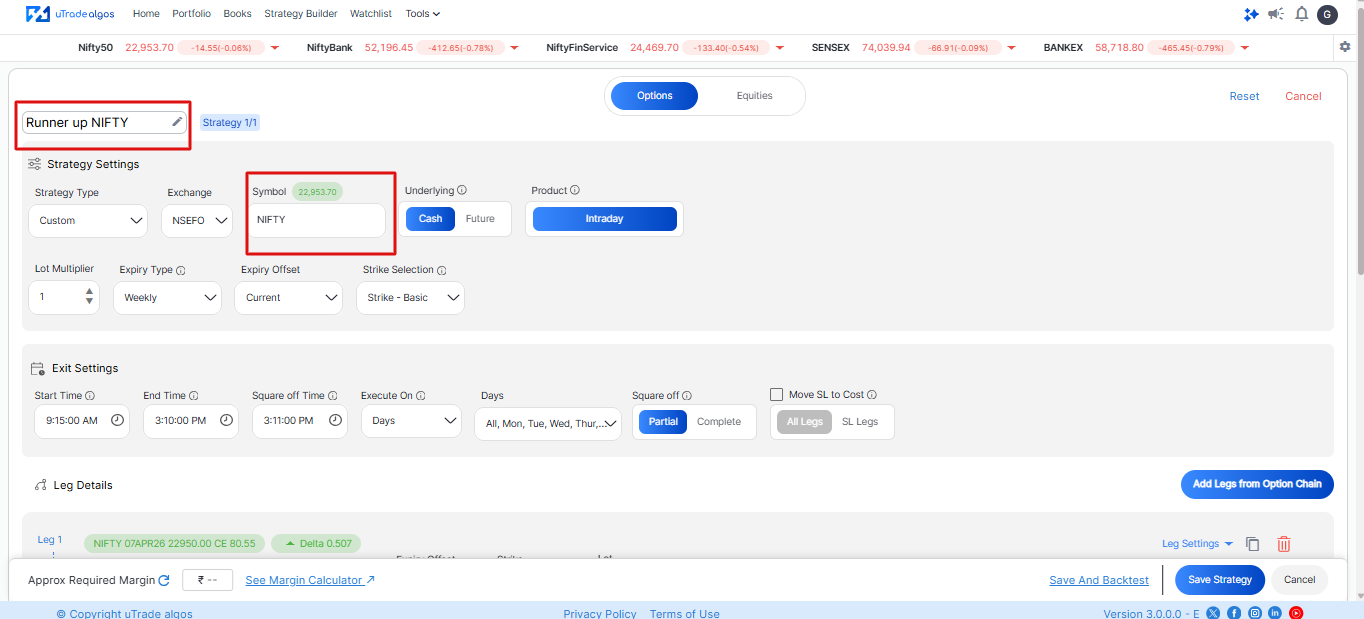
Step 3: Set:
- Entry conditions
- Exit conditions
- Strategy legs
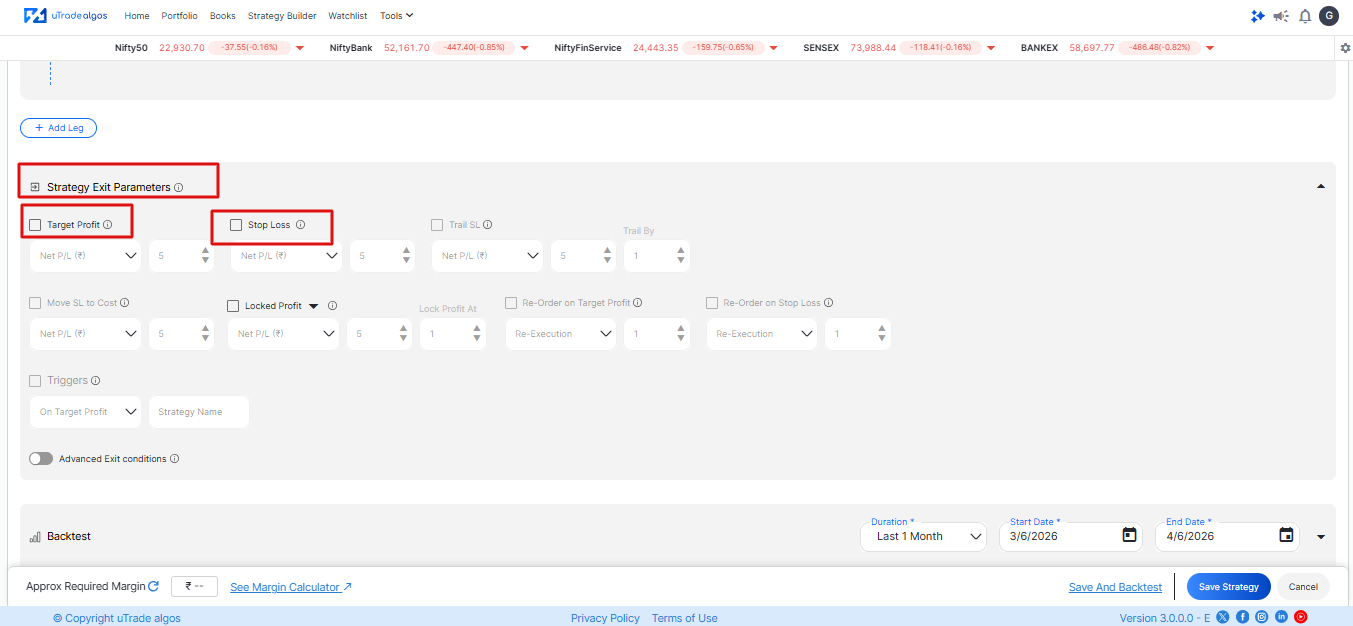
Step 4: Define risk settings
(Add stop loss, target, etc.)
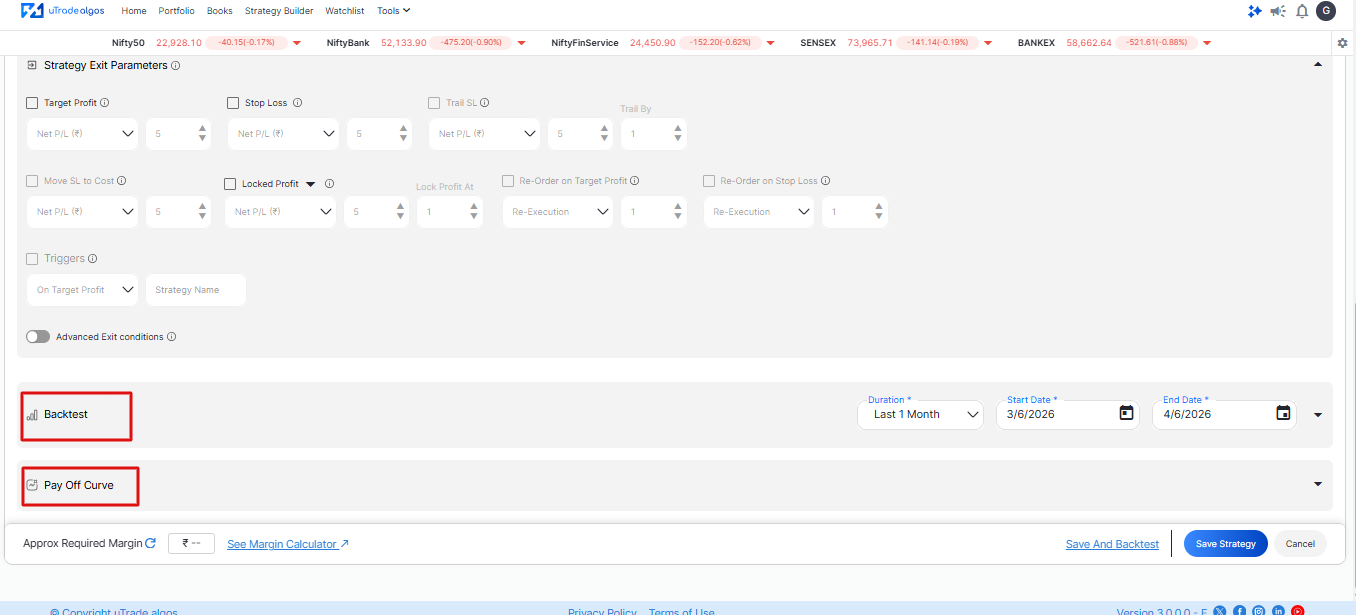
Step 5: Run a backtest to evaluate performance
- You can also check the Payoff Curve for profit and loss scenarios
- After this step, you can save the strategy.
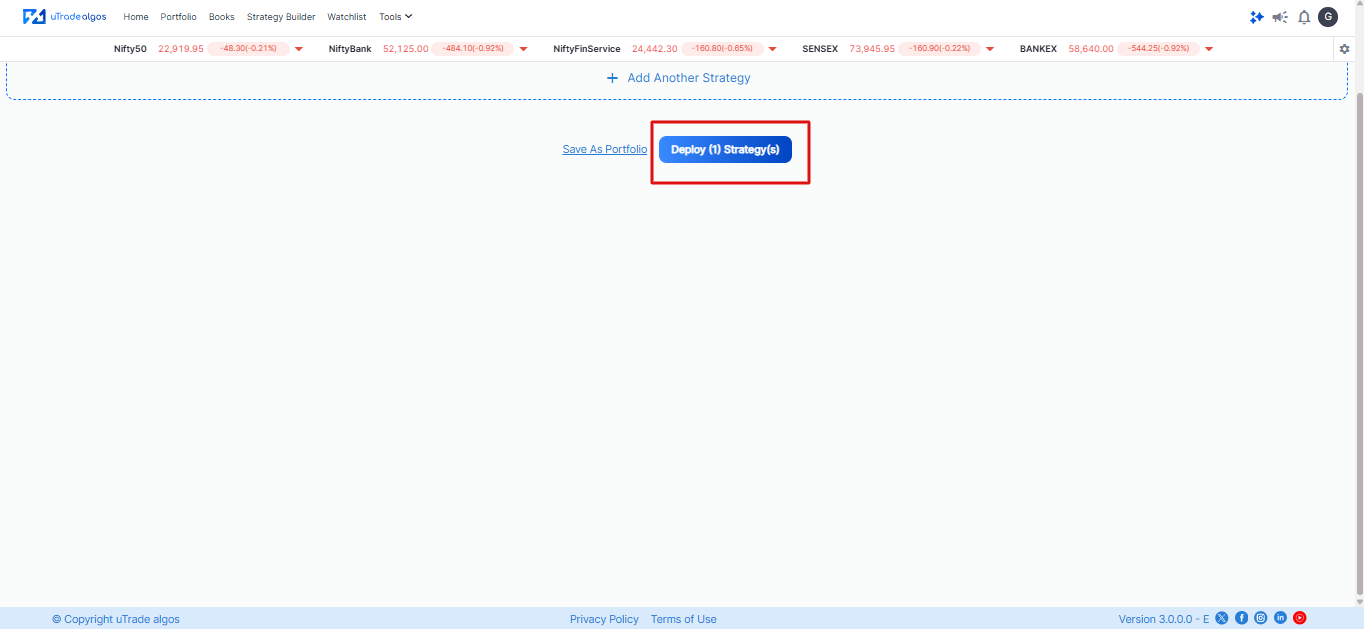
Step 6: Deploy the strategy
Suggested read: How to Build Form-Based Algos via uTrade Strategy Builder
Risk Management in a Multi-Strategy Portfolio
Smart trading isn’t just about strategies—it’s about managing risk so your portfolio stays stable and grows consistently over time.
- Risk management means controlling losses, not avoiding them
- Don’t let one strategy use all your capital
- Set a loss limit for each strategy
- Monitor total portfolio risk, not just individual trades
- Diversify strategies so one loss doesn’t impact everything
Conclusion
A portfolio in algo trading is far more than a list of strategies. It's a disciplined system — built on capital allocation logic, risk management rules, performance tracking, and regular review. The goal isn't to find one perfect algo. The goal is to combine multiple strategies in a way that smooths out returns, reduces drawdown, and creates consistent, repeatable performance across market cycles.
Whether you're just starting out with your first strategy or managing a mature multi-strategy system, the principles remain the same: diversify intelligently, size your risk carefully, monitor performance consistently, and use infrastructure that supports your ambitions.
The Indian markets — especially F&O — offer tremendous opportunity for disciplined algo portfolio traders. The edge is not just in the strategy. It's in the system that runs it.
Frequently Asked Questions (FAQs)
How many strategies should a beginner include in their algo portfolio?
Start with 2 to 3 strategies. More is not always better — running too many strategies without enough capital or understanding spreads attention thin and makes attribution analysis difficult. Master 2–3 first, then scale.
Is algo trading legal in India for retail traders?
Yes. SEBI regulates algo trading in India. Retail traders can legally use automated trading through SEBI-registered brokers that provide API access. Platforms like uTrade Algos work within this regulatory framework, routing orders through compliant broker integration.
What is the best strategy for an algo trading portfolio for NSE/BSE?
There is no single "best" strategy — it depends on market conditions. However, Indian algo traders often find success combining a trend-following strategy for directional moves, a mean reversion strategy for range-bound days, and an options-selling strategy for time decay income during low-volatility periods.
How do I manage risk in a multi-strategy algo portfolio?
Set a daily max loss limit at portfolio level (typically 2–3%). Use uncorrelated strategies so losses don't compound. Implement per-strategy drawdown limits that auto-pause a strategy if it breaches a threshold. Review performance at least monthly and rebalance allocations accordingly.
Can I build an algo trading portfolio without coding?
Yes. Platforms like uTrade Algos allow you to build and run algo portfolios using visual strategy builders, pre-built strategy templates, and a marketplace of ready-to-deploy algos — no programming knowledge required.
.avif)
.avif)
.avif)

.avif)
.avif)
.avif)

.svg)





