

Introduction
Screening thousands of stocks manually takes hours you don't have. By the time you finish analyzing fundamental data, technical indicators, and sector trends across even 100 stocks, market opportunities have passed.
uTrade AI Screener collapses this timeline from hours to seconds using artificial intelligence. Instead of building complex filters or learning screening syntax, you simply describe what you're looking for in plain English—"high dividend breakout stocks" or "undervalued momentum plays"—and the AI-powered stock scanner instantly surfaces matching opportunities.
This stock screening tool within uTrade Intelligence transforms stock discovery from tedious research into conversational search, delivering data-backed results faster than you could manually check a single chart.
Step-by-Step: Using uTrade AI Screener
Step 1: Log in and Access uTrade AI Screener
Navigate to uTrade Algos at utradealgos.com and log in using your registered credentials. Once authenticated, you land on the main dashboard.
From the main dashboard, locate the search or query input field. This may appear as a prominent search bar or chat interface where you can directly type your screening request.

Step 2: Write Your Screening Query
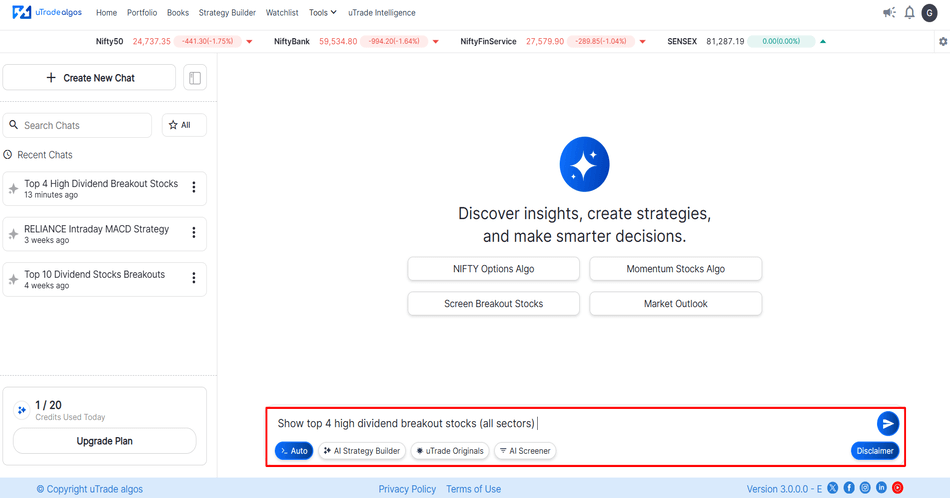
In the input field, describe what stocks you want to find using natural language. Be specific but conversational—write as if asking a knowledgeable analyst.
Example Query: "Show top 4 high dividend breakout stocks (all sectors)"
After typing your query, press Enter or click the arrow at the end of the search bar.
Step 3: Review AI-Generated Results
Within seconds, uTrade AI Screener processes your query and displays results. The initial view shows a summary table with key information about the top matching stocks.
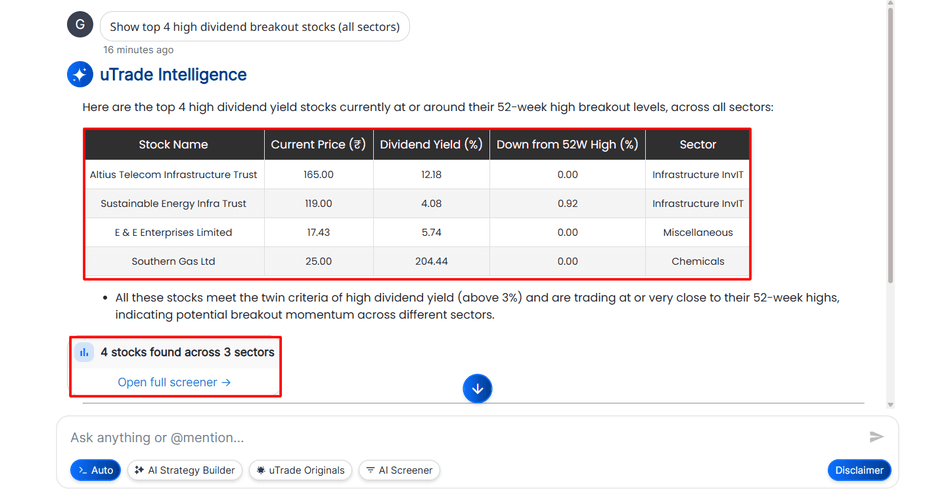
Step 4: Expand to Full Screener View
For comprehensive analysis beyond the summary, click "Open Full Screener" or a similar expansion option displayed with the results.

This opens an expanded view with:
- Symbol: Stock Name
- LTP (Last Traded Price): Current market price
- Sector: Broad sector classification (Banking, IT, Pharma, Consumer Goods)
- Industry: Specific industry within sector (Private Banks, Software Services, Pharmaceuticals)
- Current Price: Real-time or recent price data
- Div Yield (%): Dividend yield percentage (annual dividend / current price)
- Dwn 52W High (%): Percentage decline from 52-week high (shows if stock is near peaks or has corrected)
- Mar Cap (Rs.Cr.): Market capitalization in crores of rupees
- P/E: Price-to-Earnings ratio (valuation metric)
- Volume: Trading volume indicating liquidity
- RSI: Relative Strength Index (technical momentum indicator)
- Actions: Buttons for further analysis or adding to watchlists
This summary provides a quick comparison across the screened stocks, allowing rapid assessment of which opportunities merit deeper investigation.
The full screener view transforms the AI stock screener from a quick discovery tool into a comprehensive research platform.
Step 5: Explore Related Suggestions
At the end of your screening results, uTrade AI Screener displays Related Suggestions—additional screening ideas based on your original query.
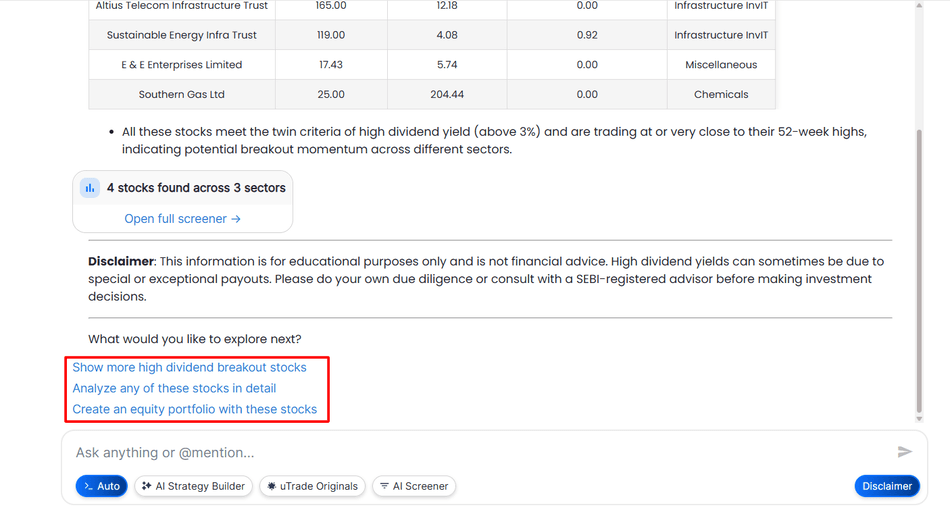
These suggestions help you:
- Refine Your Search: Maybe you want dividend consistency, not just high current yield
- Explore Adjacent Opportunities: Breakouts without dividend focus, or dividends without breakout requirement
- Discover New Angles: Suggestions might highlight criteria you hadn't considered
How to Use Suggestions: Click any suggestion to automatically run that screening query, seeing results instantly without typing. This iterative exploration helps you discover opportunities beyond your initial idea.
Step 6: Modify and Re-Screen
Not satisfied with initial results? Easily modify your query and re-screen:
Simply type your modified query in the input field and submit. uTrade AI Screener processes the new request instantly, displaying updated results within seconds.
Iterative Workflow Example:
Query 1: "High dividend stocks" → Returns 50 results, too many
Query 2: "Top 10 high dividend large-cap stocks" → Better, but includes sectors you don't want
Query 3: "Top 10 high dividend large-cap banking and FMCG stocks" → Perfect, manageable list in preferred sectors
This conversational refinement makes the AI-powered stock scanner feel like working with a research assistant who understands incremental improvements.
Suggested Reading:
How to Deploy Your First AI Algo with uTrade AI Strategy Builder
Conclusion
The days of spending weekends manually comparing stock metrics are over. uTrade AI Screener collapses exhaustive research into conversational queries, delivering thousands of evaluated opportunities in seconds through AI-powered stock scanning.
You've learned the complete workflow—from writing natural language queries to exploring full screener results and refining searches iteratively.
This stock screening tool within uTrade Intelligence isn't just faster than traditional methods; it's fundamentally different, making sophisticated screening accessible to everyone regardless of technical knowledge. Your next investment opportunity is waiting. Describe what you're looking for, let the AI scan, and discover stocks worth your capital.
Frequently Asked Questions
Can uTrade AI Screener search across both NSE and BSE exchanges?
Yes. uTrade AI Screener searches across all stocks listed on the NSE and BSE exchanges simultaneously. You don't need to specify the exchange unless you want results limited to one. The AI-powered stock scanner evaluates the entire Indian equity universe by default.
How often is the screening data updated on uTrade Intelligence?
Screening data updates in real-time during market hours. Price, volume, and technical indicators reflect current market conditions. Fundamental data (earnings, dividends, financials) updates as companies report. Results remain current, not delayed, ensuring timely opportunity identification.
Can I save my favorite screening queries for repeated use?
Yes. uTrade AI Screener allows saving frequently used queries for one-click re-screening. This is particularly valuable for regular monitoring of specific criteria like "weekly high dividend screen" or "daily momentum breakouts." Saved queries maintain consistency in research approach.
Does the AI screener work for options and futures or only equity stocks?
uTrade AI Screener primarily focuses on equity stocks across NSE and BSE. For options and futures screening, the platform offers different tools within uTrade Intelligence and Strategy Builder, specifically designed for derivative instruments with criteria relevant to those markets.
What happens if my screening query is too vague or unclear?
The AI interprets your query as best as possible and returns results. If ambiguous, it may ask clarifying questions or provide broader results than intended. Simply refine your query with more specific criteria and re-screen for better-targeted results.
.avif)
.avif)
.avif)
.avif)
.avif)
.avif)
.avif)

.svg)





