

Introduction
Most traders check five different apps before placing a single trade. News portals, index charts, FII data, volatility readings — it's a lot of noise for a simple question: where is the market headed today?
uTrade AI Market Outlook answers that question in one place, in seconds. Powered by the latest market feed, it gives you a structured daily view of Indian market direction — covering key indices like NIFTY 50, SENSEX, Bank Nifty, and India VIX, along with FII/DII activity, macro cues, and what to watch next. One prompt. One complete picture.
What Is uTrade AI Market Outlook
If you have ever wished for a single, intelligent summary of everything moving the Indian market today, that is exactly what AI Market Outlook inside uTrade Intelligence delivers.
It is a pre-built market intelligence feature on uTrade Algos that pulls together real-time index data, volatility readings, institutional flows, macro drivers, and key market news — and presents it in a clean, structured format you can actually act on. Unlike manually scanning multiple platforms, the AI Market Outlook processes the latest market feed and gives you a comprehensive daily outlook in seconds.
The output covers everything a trader needs before placing a trade — where indices stand, what is driving movement, what the volatility environment looks like, and what cues to watch for the rest of the session. It is not generic market commentary. It is a live, data-backed read of the Indian market tailored to help you plan your next move with clarity and confidence.
How to Use AI Market Outlook on uTrade Algos
Getting your daily market outlook takes less than a minute once you know where to look. Here is the exact flow.
Step 1: Log In and Open uTrade Intelligence
Log in to your uTrade Algos account and head to the home screen. At the bottom-centre of the screen, you will find the uTrade Intelligence interface — a conversational AI input where you can type any query related to the market, stocks, or strategies.

You will also see pre-set quick-access options above the input bar, including one labelled Market Outlook. For this tutorial, click on the Market Outlook option.
Step 2: Let AI Generate Your Market Outlook
Once you click on Market Outlook, uTrade Intelligence automatically expands your simple selection into a comprehensive query —
“asking for today's Indian market direction, key drivers, latest index prices including NIFTY 50, SENSEX, Bank Nifty, and India VIX updated via the latest market feed, current volatility readings, and relevant macro and earnings cues.”
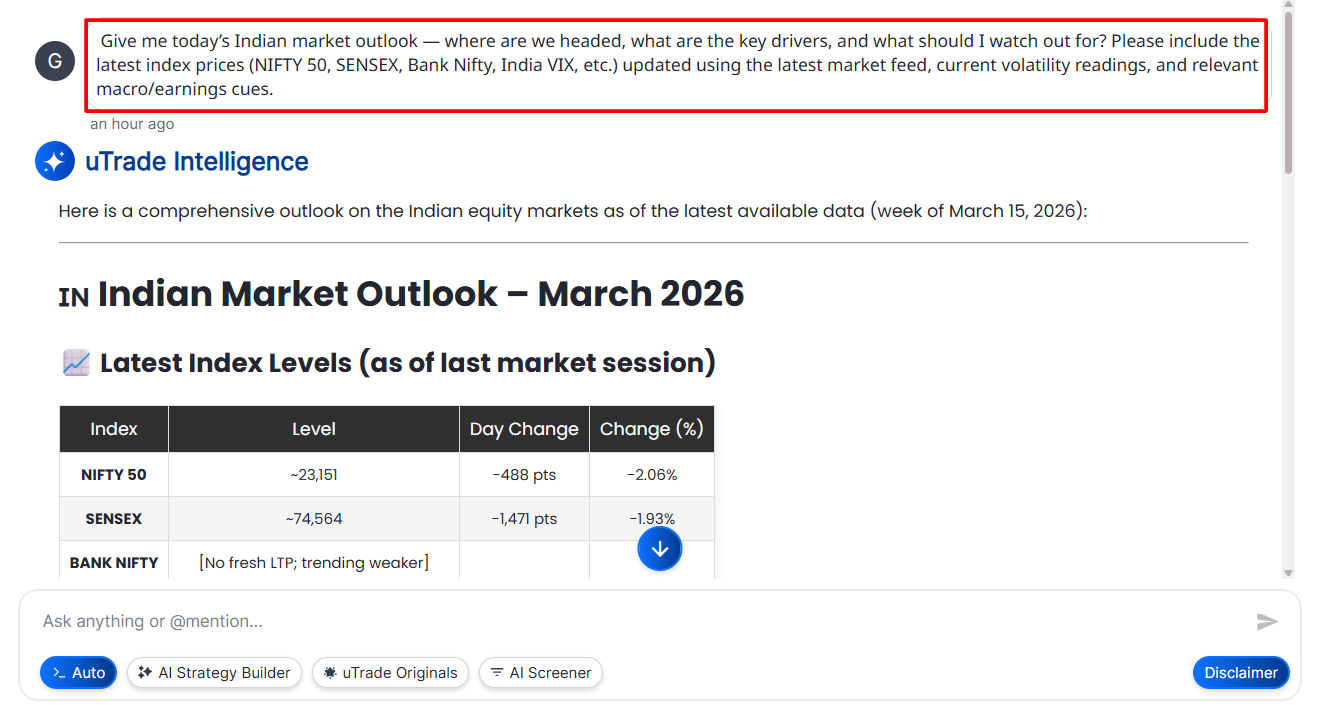
Within seconds, the AI processes this and delivers a fully structured AI Market Outlook covering all the sections described above — index levels, market mood, macro highlights, what to watch, and a tactical take.

You do not need to type anything. The feature does the work for you.
Step 3: Read the Outlook and Explore Further
Go through the structured output section by section. At the end of the market outlook, uTrade Intelligence also surfaces follow-up suggestions based on your current read —
for example, prompts like "See a list of stocks with strong support in a weak market", "Get latest options data for NIFTY/BANKNIFTY", or "Analyse safe-haven stocks for downside protection."
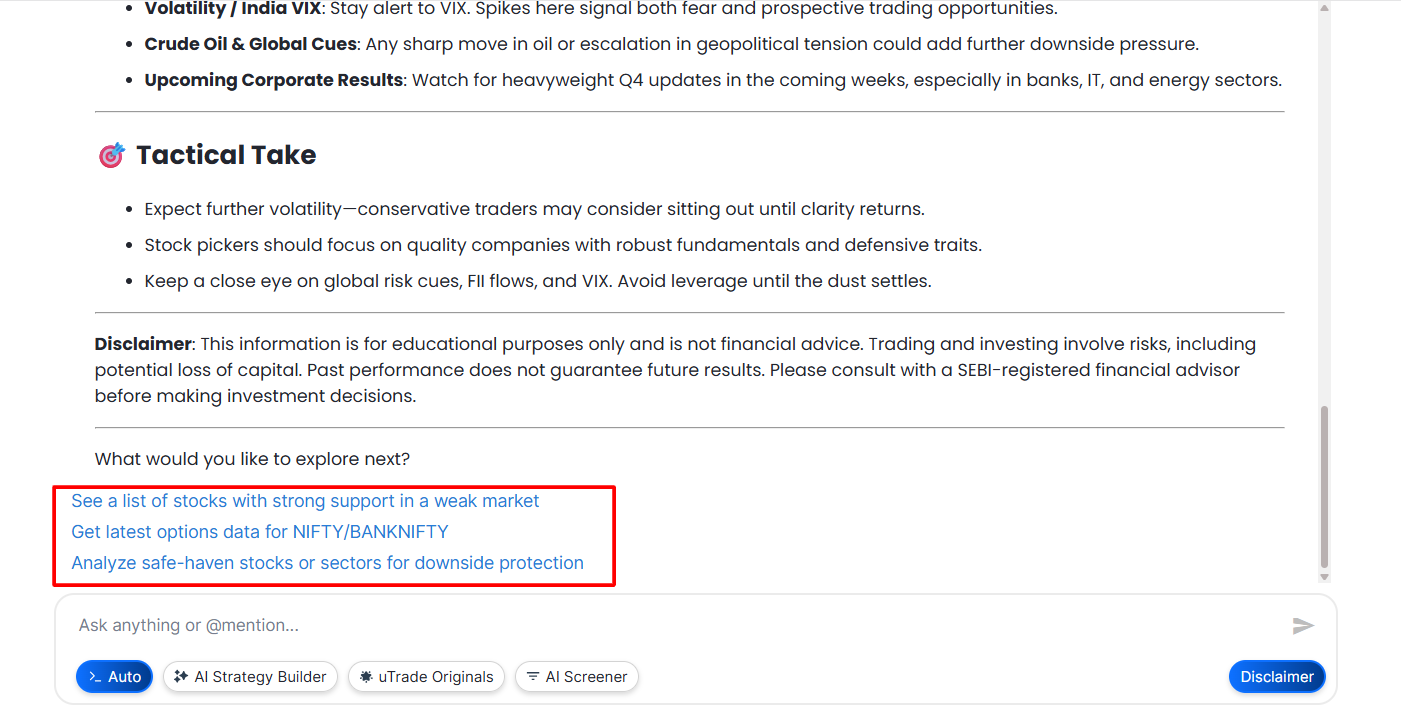
If you want to dig deeper into any specific aspect — say, a particular sector, a macro driver, or a specific index level — you can either click one of the suggestions or type your own follow-up query directly into the input bar in plain language.
Step 4: Use the Outlook to Plan and Deploy Your Strategy
The market outlook is not just for reading — it is a starting point for action. Once you have a clear picture of market direction and sentiment, you can use uTrade Intelligence to create an AI-generated strategy that aligns with the current market environment. From there, you can backtest the strategy against historical data and deploy it live with connected broker deployment — all in one click, without leaving the platform.
This is what makes the AI Market Outlook more than a news summary. It sits at the beginning of a complete trading workflow — from market read to strategy to live execution.
Suggested Reading: How to Deploy Your First AI Algo with uTrade AI Strategy Builder
Conclusion
The best trade decisions start before the market opens — with a clear read of where things stand and what is likely to move. uTrade AI Market Outlook gives you exactly that: a structured, AI-powered daily brief on the Indian market that covers indices, sentiment, institutional flows, volatility, and actionable cues in one place.
You no longer need five tabs and forty-five minutes to get market-ready. Open uTrade Intelligence, click Market Outlook, and start your trading day with clarity instead of noise. Your next well-timed trade might begin right there.
Frequently Asked Questions (FAQs)
What is AI Market Outlook on uTrade Algos?
AI Market Outlook is a feature inside uTrade Intelligence that gives you a daily structured view of Indian market direction — covering NIFTY 50, SENSEX, Bank Nifty, India VIX, FII/DII flows, macro cues, and actionable trading insights in seconds.
Is AI Market Outlook updated with live market data?
Yes. The AI Market Outlook on uTrade Algos is powered by the latest market feed, pulling real-time or near-real-time index levels, volatility data, and institutional flow information to generate a current and accurate market view.
Do I need to type a prompt to get the Market Outlook?
No. uTrade Intelligence offers a pre-set Market Outlook option on the home screen. Clicking it automatically generates a comprehensive market outlook without needing to write any prompt manually.
Can I use AI Market Outlook to build a trading strategy?
Yes. After reading the market outlook, you can use uTrade Intelligence to create an AI-generated strategy aligned with current market conditions, backtest it, and deploy it live — all within the same platform.
Is AI Market Outlook useful for options traders?
Yes. The outlook covers India VIX, volatility environment, FII/DII flows, and key index levels — all critical inputs for options traders assessing premium levels, directional bias, and risk before entering positions.



.svg)





